

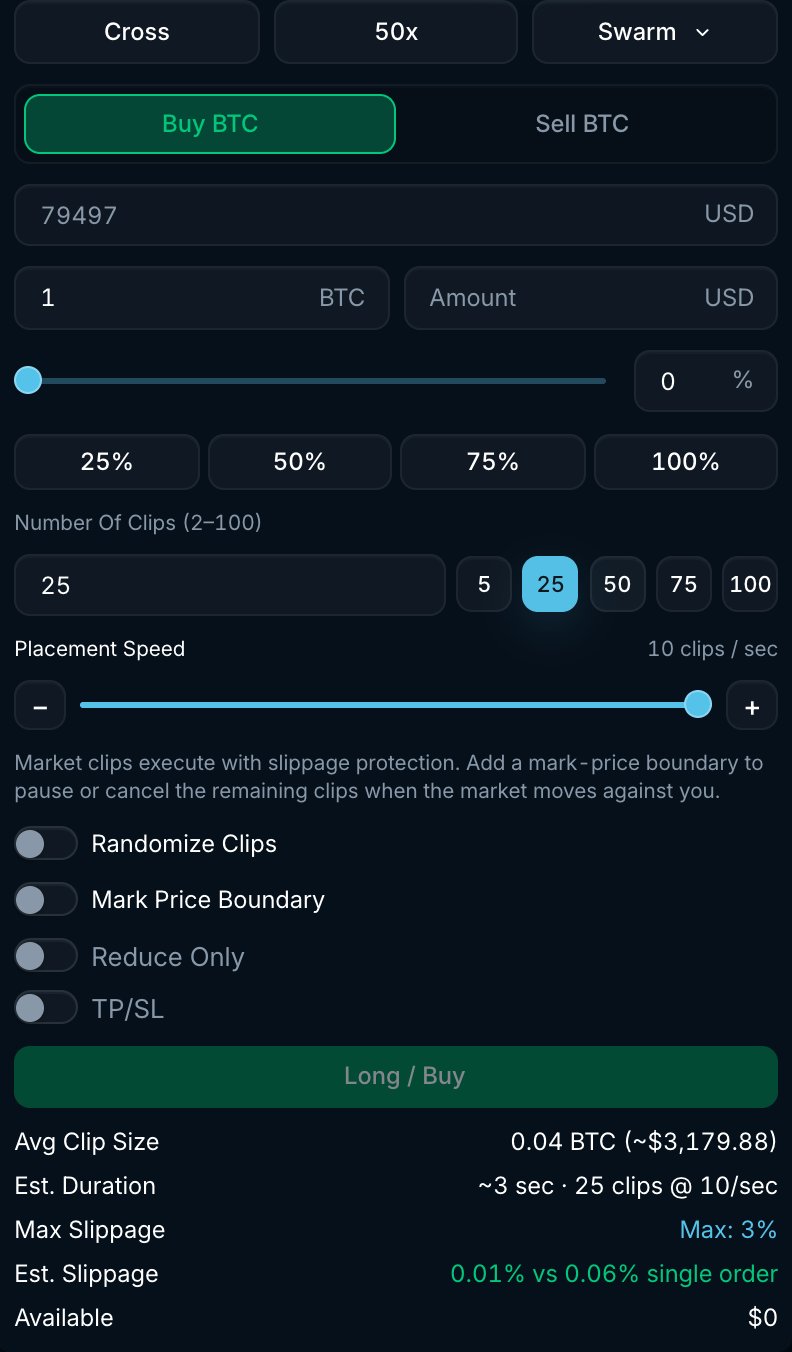
BTC Swarm form with clip count, placement speed and an estimated duration.
How it works
- Enter the total Amount, the Number Of Clips (2 to 100) and the Placement Speed (1 to 10 clips per second).
- Pacifica divides your amount into clips. Without randomization, the clips are evenly sized, subject to lot-size rounding, and scheduled at regular intervals.
- Each clip is placed as a market order using your Max Slippage. Actual placement can be slower than the selected speed while earlier orders are being processed.
- The Swarm completes when the cumulative fills reach the target amount.
Settings
The form shows the Avg Clip Size, the Est. Duration and an Est. Slippage comparison against a single market order of the same size.
Example
You want to buy 1 BTC quickly in smaller orders:- Select Swarm, with Amount 1 BTC, Number Of Clips 25, Placement Speed 10 clips per second and Randomize Clips on.
- Set Mark Price Boundary to $101,000 and action Pause.
- The average clip is 0.04 BTC and the target interval is 0.1 seconds; randomization varies both. If the mark price rises to $101,000 during execution, the remaining clips wait until it drops back below, then continue.
Good to know
- Each clip is an independent market order. Every fill appears in Trade History, and a clip can be partially filled if the book is thin within your slippage.
- Temporary order rejections can delay execution. Repeated rejections or insufficient balance can end the strategy before the full amount fills. Check its status and filled amount.
- Swarms are listed in the Strategies tab under Swarm, showing clips placed, filled amount and average fill price.
- For execution over minutes or hours, use TWAP. To start after a price condition is met, use Trigger Swarm.