

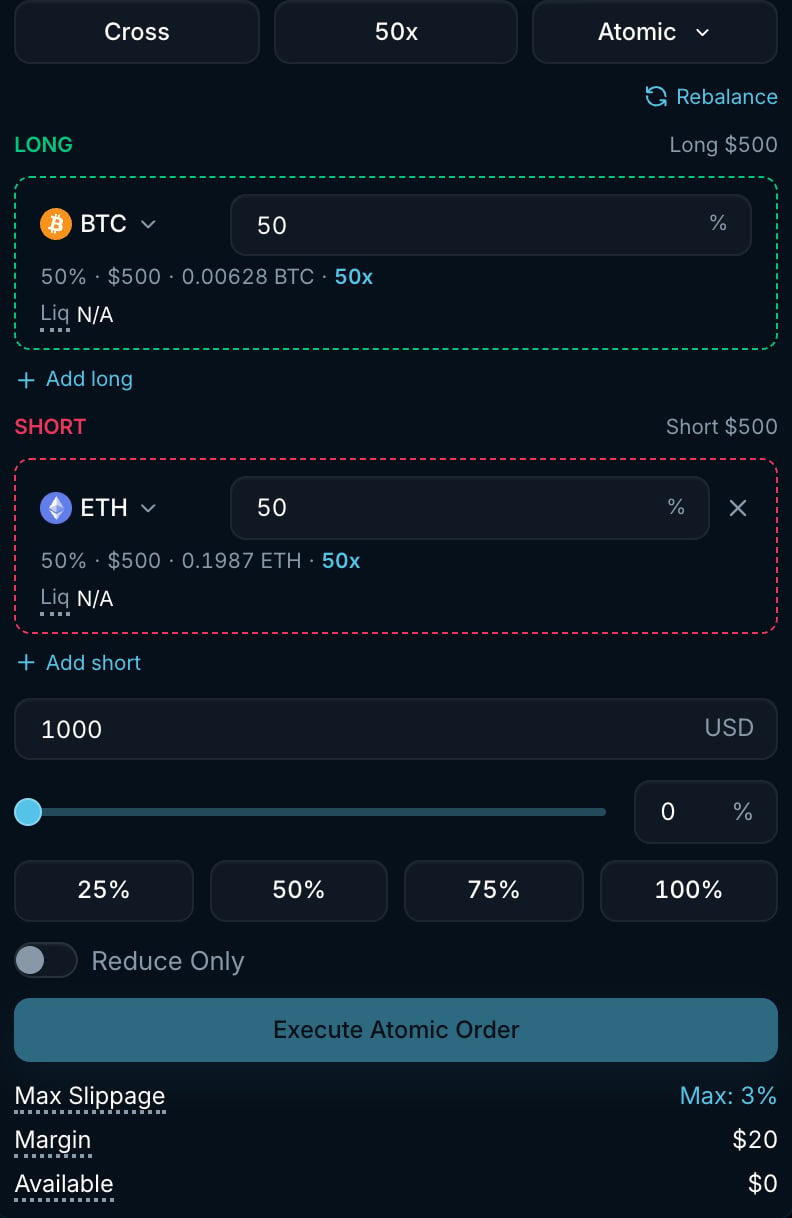
Atomic form with a BTC long and an ETH short. The form shows each leg's size, leverage and the total margin required.
Atomic does not guarantee an all-or-nothing fill. One leg can fill even if another is rejected or only partially filled.
How it works
- The market you are viewing is added as the first long leg. Use Add long and Add short to add more legs, up to 5 on each side, and click a leg’s symbol to swap it for another market.
- Set each leg’s weight. Weights are relative, so they do not have to add up to 100. The form shows each leg’s effective share, USD notional, token amount, leverage and estimated liquidation price.
- Enter the Total size in USD, or use the slider and percentage buttons. 100% sizes the basket to the largest notional your idle margin allows across all legs. Rebalance resets every leg to an equal weight.
- Click Execute Atomic Order. Each leg is signed as a market order with your Max Slippage, and all legs are sent to the exchange in a single batch request. Each leg can fill or fail independently.
Settings
The Margin row shows the total initial margin the basket needs: each leg’s notional divided by that market’s leverage, summed.
Example
You want a basket with $1,000 of total notional, split equally between a BTC long and an ETH short:- Set the long leg to BTC with weight 50, the short leg to ETH with weight 50 and Total size to $1,000.
- The form shows $500 of BTC and $500 of ETH, with the token amounts calculated from their current mark prices.
- On Execute Atomic Order, both market orders are submitted together.
Good to know
- Each leg is an ordinary market order on its own market. Fills are shown per market in Trade History, and the positions appear separately in Positions.
- Legs are validated independently by the engine. If one leg is rejected (for example, it is below that market’s minimum order size or you lack margin), other legs may still execute. Check Trade History and Positions after submitting a basket.
- Each leg’s slippage protection applies to that leg alone, so a thin market in the basket can be partially filled while the others fill completely.
- Atomic orders are not strategies. They do not appear in the Strategies tab.