

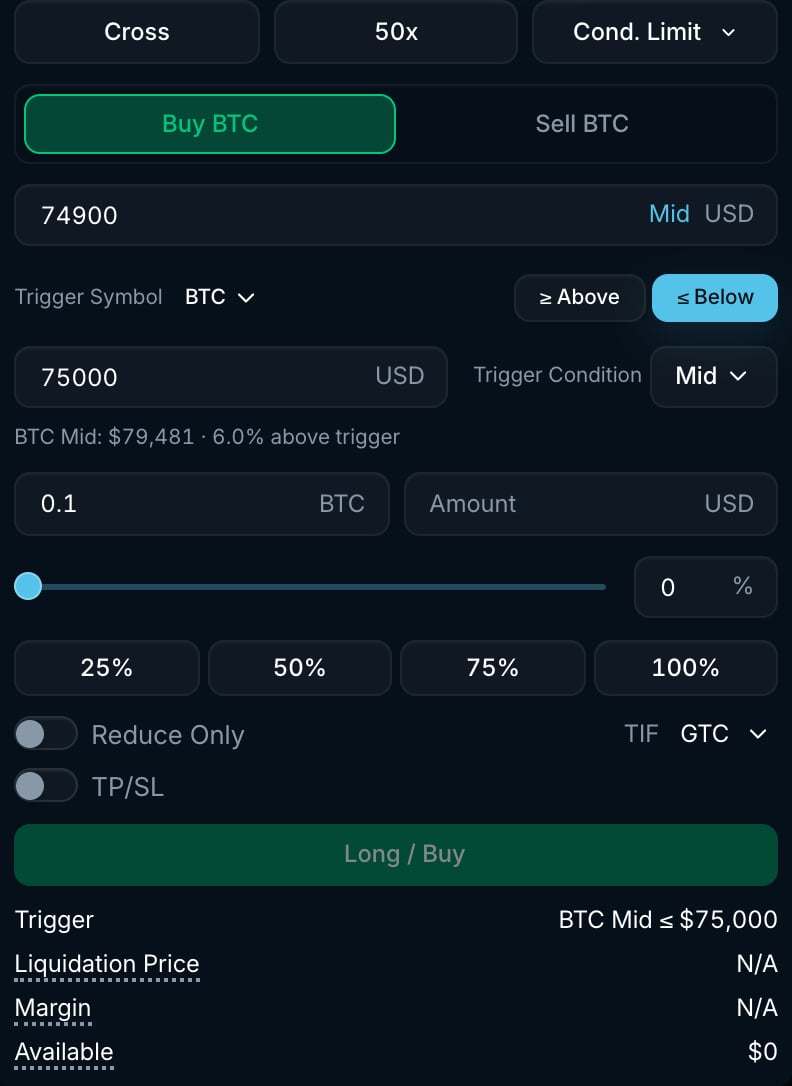
BTC Conditional Limit form with separate trigger and limit prices.
How it works
- Pick the Trigger Symbol. It defaults to the market you are trading, but you can watch another market on Pacifica.
- Choose ≥ Above or ≤ Below, then enter the Trigger Price.
- Choose the Trigger Condition price source: Mid, Mark, Last, Best Bid or Best Ask.
- Enter the Amount, limit Price and TIF, then choose your side.
- When the chosen price meets the condition, Pacifica submits the limit order. Its time-in-force determines what happens to any unfilled amount.
Settings
Example
You expect BTC to bounce after a dip and want to place a limit buy when its mid price reaches $95,000:- Select Cond. Limit, with Trigger Symbol set to BTC, ≤ Below $95,000 and Trigger Condition set to Mid.
- Set Price to $94,900, TIF to GTC and Amount to 0.1 BTC.
- When mid reaches $95,000 or lower, a GTC limit buy at $94,900 is placed. Any unfilled amount rests until it fills or you cancel it.
Good to know
- Reaching the trigger does not guarantee a fill. The market may move away from your limit price.
- Use ALO for a post-only order or TOB for a top-of-book order. See Time-in-force.
- Open conditional orders appear in Strategies, under Conditional Orders. A resting limit order appears in Open Orders after the trigger.
- To place a market order when the condition is met, use Conditional Market.