

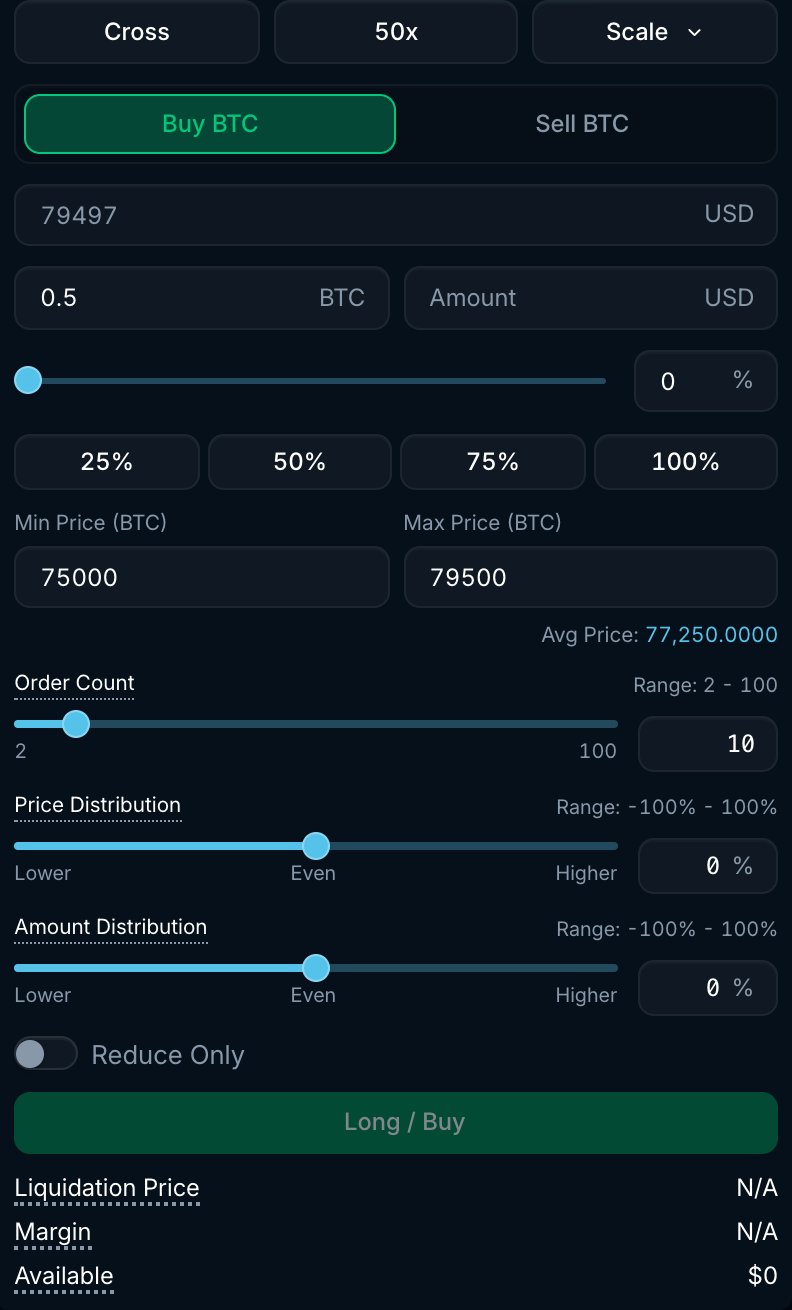
BTC Scale form with price range, order count and distribution settings. The form shows the ladder's average price.
How it works
- Enter the total Amount you want to trade and the price range.
- Choose the Order Count (2 to 100). Your amount is split into that many limit orders.
- Optionally skew the ladder with the two distribution sliders (see below).
- Click Long / Buy or Short / Sell. Pacifica submits the ladder as GTC limit orders. Orders that match available prices can fill immediately; the remainder rests on the book.
Settings
The form shows an Avg Price estimate. Review the prices and amounts before submitting the ladder.
Example
You want to buy 0.5 BTC if the price pulls back from $100,000 into the $95,000 to $99,500 range, and you want more size the lower it goes:- Min Price $95,000, Max Price $99,500, Order Count 10.
- Price Distribution 0% (even spacing, one order every $500).
- Amount Distribution -50% (Lower), so the order at $95,000 is about six times the size of the order at $99,500: roughly 0.0857 BTC and 0.0143 BTC, before lot-size rounding.
Good to know
- Prices and amounts are rounded to the market’s tick and lot sizes. A narrow range can produce multiple orders at the same price.
- A Scale ladder is a set of ordinary limit orders, so it appears in Open Orders, not in the Strategies tab.
- Limit orders pay maker fees when they rest and fill. A buy at or above the best ask, or a sell at or below the best bid, can fill immediately and pay taker fees.
- Orders are accepted individually. Check Open Orders and Trade History to confirm the ladder, especially if any order is rejected.