> ## Documentation Index
> Fetch the complete documentation index at: https://docs.pacifica.fi/llms.txt
> Use this file to discover all available pages before exploring further.
# Trigger Swarm
> Wait for a price condition, then place an amount as a sequence of small market orders, one at a time.
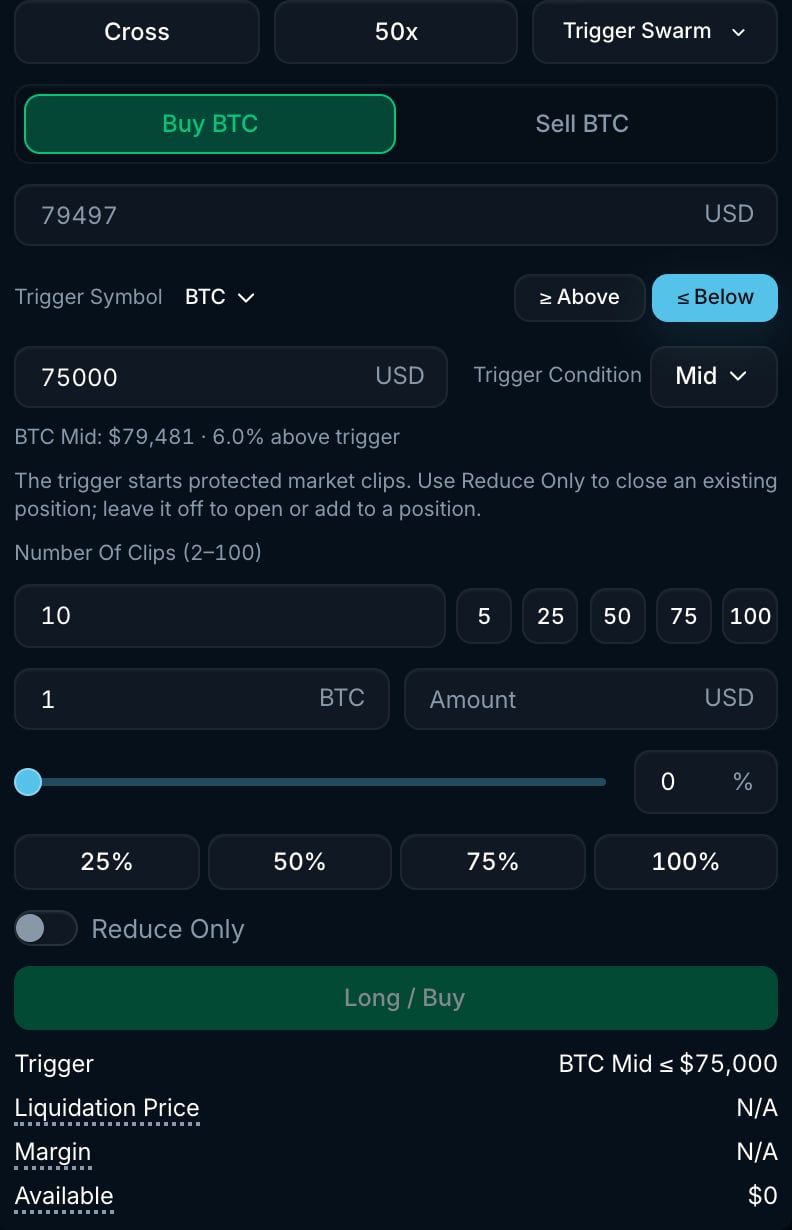
A Trigger Swarm combines a [conditional trigger](/trading-on-pacifica/order-types/strategies/conditional-market) with clip-by-clip market execution. Execution starts when the watched price meets your condition. Then Pacifica works the order in a series of market clips, sending the next clip only after the previous one has settled. Use it to split an order into smaller trades after a price trigger.
 ## How it works
1. Set the trigger exactly as for a conditional order: **Trigger Symbol** (any market), **≥ Above** or **≤ Below**, **Trigger Price**, and the **Trigger Condition** price source (**Mid**, **Mark**, **Last**, **Best Bid** or **Best Ask**).
2. Set the total **Amount** and the **Clip Count** (2 to 100).
3. When the condition is met, the strategy starts placing clips. A condition that is already met can trigger immediately.
4. Clips are placed sequentially. Each clip is a market order with your **Max Slippage** for the remaining amount divided by the remaining clips. The next clip is sent as soon as the previous one has settled. If a clip only partially fills, the shortfall rolls into the remaining clips.
5. The strategy completes when the target amount has filled.
## Settings
| Setting | Options | What it does |
| --------------------- | ------------------------------------------------------- | ----------------------------------------------------------------------------------------------------------- |
| **Trigger Symbol** | Any market | The market whose price is watched. Can differ from the market you trade. |
| **≥ Above / ≤ Below** | Above / Below | Direction of the trigger. |
| **Trigger Price** | Positive price | The level to watch. |
| **Trigger Condition** | **Mid**, **Mark**, **Last**, **Best Bid**, **Best Ask** | The price source for the trigger. |
| **Clip Count** | 2 to 100 | How many market clips the amount is split into. Every clip must be at least one lot. |
| **Reduce Only** | On / Off | Every clip is reduce-only. Use it to close an existing position. Leave it off to open or add to a position. |
## Trigger Swarm as a position exit
From the **Positions** table you can attach a Trigger Swarm to an open position (**Trigger Swarm** tab of the **TP/SL** dialog). In that mode, its target is the **full position size at trigger time**. It is cancelled if the position is gone or has changed side before the trigger. A full exit still depends on the clips filling.
## Example
You are long 1 BTC and want to exit if the market breaks down, but want to split the exit into smaller market orders:
* Select **Trigger Swarm**, side **Sell**, **Trigger Symbol** BTC, **≤ Below** \$95,000, **Trigger Condition** **Mark**, **Clip Count** 10, **Amount** 1 BTC and **Reduce Only** on.
* When the mark price reaches \$95,000 or lower, a 0.1 BTC market sell is placed. If each clip fills in full, the next clips are also 0.1 BTC. Partial fills change the size of later clips.
## Good to know
* Until the condition is met, a Trigger Swarm holds nothing on the book and shows as *Active* in the **Strategies** tab (**Trigger Swarm** sub-tab).
* Temporary rejections can be retried. If execution ends before any clip is accepted or filled, the status is **Trigger failed**. If a clip was accepted or filled, it ends as **Cancelled**. Check the filled amount for any remaining position.
* Unlike a plain [Swarm](/trading-on-pacifica/order-types/strategies/swarm), a Trigger Swarm has no placement-speed setting. Its pace is set by how quickly each clip settles.
## How it works
1. Set the trigger exactly as for a conditional order: **Trigger Symbol** (any market), **≥ Above** or **≤ Below**, **Trigger Price**, and the **Trigger Condition** price source (**Mid**, **Mark**, **Last**, **Best Bid** or **Best Ask**).
2. Set the total **Amount** and the **Clip Count** (2 to 100).
3. When the condition is met, the strategy starts placing clips. A condition that is already met can trigger immediately.
4. Clips are placed sequentially. Each clip is a market order with your **Max Slippage** for the remaining amount divided by the remaining clips. The next clip is sent as soon as the previous one has settled. If a clip only partially fills, the shortfall rolls into the remaining clips.
5. The strategy completes when the target amount has filled.
## Settings
| Setting | Options | What it does |
| --------------------- | ------------------------------------------------------- | ----------------------------------------------------------------------------------------------------------- |
| **Trigger Symbol** | Any market | The market whose price is watched. Can differ from the market you trade. |
| **≥ Above / ≤ Below** | Above / Below | Direction of the trigger. |
| **Trigger Price** | Positive price | The level to watch. |
| **Trigger Condition** | **Mid**, **Mark**, **Last**, **Best Bid**, **Best Ask** | The price source for the trigger. |
| **Clip Count** | 2 to 100 | How many market clips the amount is split into. Every clip must be at least one lot. |
| **Reduce Only** | On / Off | Every clip is reduce-only. Use it to close an existing position. Leave it off to open or add to a position. |
## Trigger Swarm as a position exit
From the **Positions** table you can attach a Trigger Swarm to an open position (**Trigger Swarm** tab of the **TP/SL** dialog). In that mode, its target is the **full position size at trigger time**. It is cancelled if the position is gone or has changed side before the trigger. A full exit still depends on the clips filling.
## Example
You are long 1 BTC and want to exit if the market breaks down, but want to split the exit into smaller market orders:
* Select **Trigger Swarm**, side **Sell**, **Trigger Symbol** BTC, **≤ Below** \$95,000, **Trigger Condition** **Mark**, **Clip Count** 10, **Amount** 1 BTC and **Reduce Only** on.
* When the mark price reaches \$95,000 or lower, a 0.1 BTC market sell is placed. If each clip fills in full, the next clips are also 0.1 BTC. Partial fills change the size of later clips.
## Good to know
* Until the condition is met, a Trigger Swarm holds nothing on the book and shows as *Active* in the **Strategies** tab (**Trigger Swarm** sub-tab).
* Temporary rejections can be retried. If execution ends before any clip is accepted or filled, the status is **Trigger failed**. If a clip was accepted or filled, it ends as **Cancelled**. Check the filled amount for any remaining position.
* Unlike a plain [Swarm](/trading-on-pacifica/order-types/strategies/swarm), a Trigger Swarm has no placement-speed setting. Its pace is set by how quickly each clip settles.