> ## Documentation Index
> Fetch the complete documentation index at: https://docs.pacifica.fi/llms.txt
> Use this file to discover all available pages before exploring further.
# Swarm
> Split an order into small market orders placed in quick succession, with optional randomization and a price boundary.
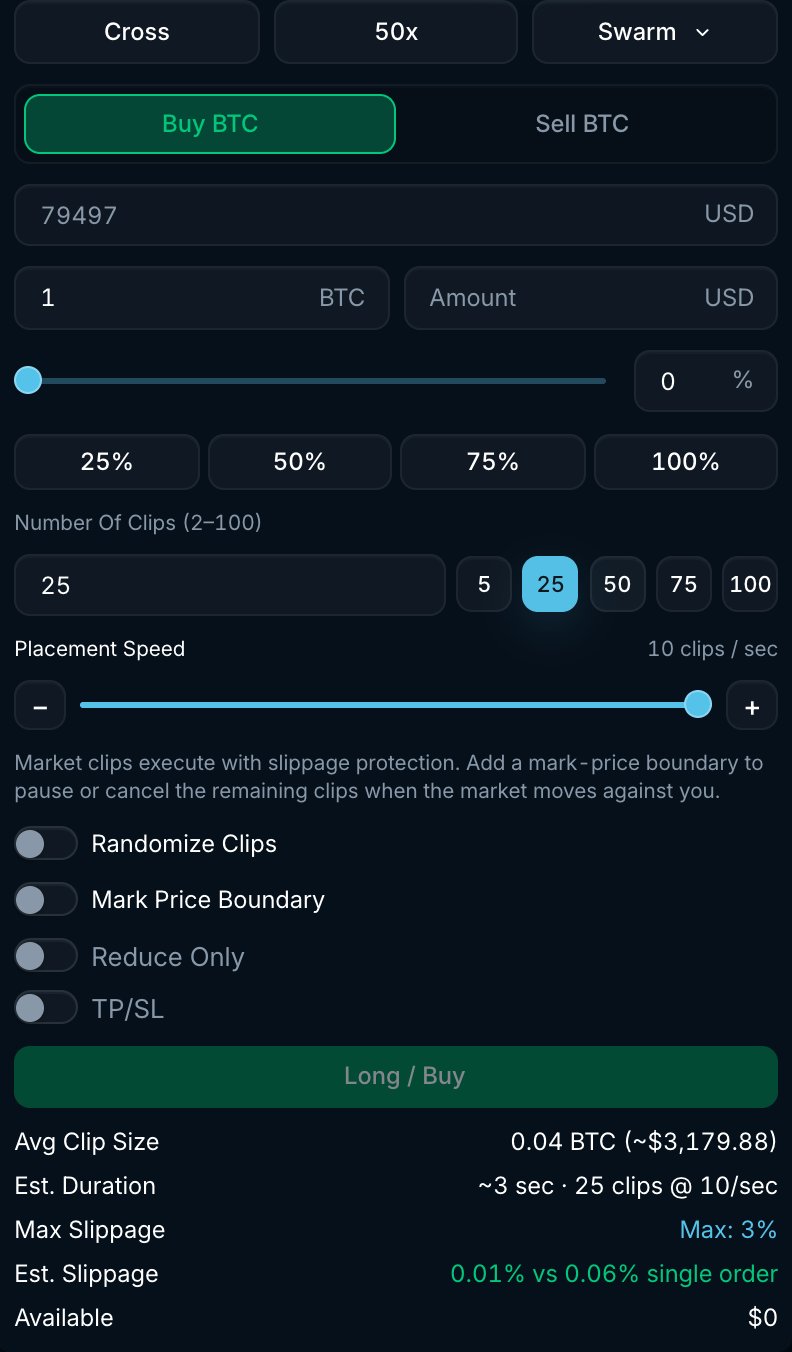
A Swarm splits an amount into smaller market orders, called clips. You choose how many clips to place and how quickly to place them, from 1 to 10 clips per second. Each clip has slippage protection. Execution price still depends on the liquidity available when each clip reaches the market.
 ## How it works
1. Enter the total **Amount**, the **Number Of Clips** (2 to 100) and the **Placement Speed** (1 to 10 clips per second).
2. Pacifica divides your amount into clips. Without randomization, the clips are evenly sized, subject to lot-size rounding, and scheduled at regular intervals.
3. Each clip is placed as a market order using your **Max Slippage**. Actual placement can be slower than the selected speed while earlier orders are being processed.
4. The Swarm completes when the cumulative fills reach the target amount.
## Settings
| Setting | Range | What it does |
| -------------------------------- | ------------------------ | ---------------------------------------------------------------------------------------------------------------------------------------------------------------------------------------------------------------------------------------------------------------------------- |
| **Number Of Clips** | 2 to 100 | How many market orders the amount is split into. Every clip must be at least one lot and meet the market's minimum order size. |
| **Placement Speed** | 1 to 10 clips / sec | The target rate for placing clips. The form estimates about 3 seconds for 25 clips at 10 per second. |
| **Randomize Clips** | On / Off | Varies both the clip sizes and the gaps between them instead of using a fixed pattern. Sizes vary between roughly 50% and 150% of the average clip, and each gap between 0.5× and 1.5× the base interval. Lot-size rounding and minimum order sizes can limit the variation. |
| **Mark Price Boundary** | Positive price, optional | A limit on how far the mark price may move against you. For a buy it is a ceiling, for a sell it is a floor. Touching the boundary counts as crossing it. |
| **When the boundary is crossed** | **Pause** or **Cancel** | **Pause** holds the remaining clips while the mark is beyond the boundary and resumes when it comes back. **Cancel** ends the Swarm, keeping the fills so far. |
| **Reduce Only** | On / Off | Every clip is reduce-only. Cannot be combined with **TP/SL**. |
| **TP/SL** | Optional | Take profit and stop loss for the position the Swarm builds. |
The form shows the **Avg Clip Size**, the **Est. Duration** and an **Est. Slippage** comparison against a single market order of the same size.
## Example
You want to buy 1 BTC quickly in smaller orders:
* Select **Swarm**, with **Amount** 1 BTC, **Number Of Clips** 25, **Placement Speed** 10 clips per second and **Randomize Clips** on.
* Set **Mark Price Boundary** to \$101,000 and action **Pause**.
* The average clip is 0.04 BTC and the target interval is 0.1 seconds; randomization varies both. If the mark price rises to \$101,000 during execution, the remaining clips wait until it drops back below, then continue.
## Good to know
* Each clip is an independent market order. Every fill appears in **Trade History**, and a clip can be partially filled if the book is thin within your slippage.
* Temporary order rejections can delay execution. Repeated rejections or insufficient balance can end the strategy before the full amount fills. Check its status and filled amount.
* Swarms are listed in the **Strategies** tab under **Swarm**, showing clips placed, filled amount and average fill price.
* For execution over minutes or hours, use [TWAP](/trading-on-pacifica/order-types/classic/twap). To start after a price condition is met, use [Trigger Swarm](/trading-on-pacifica/order-types/strategies/trigger-swarm).
## How it works
1. Enter the total **Amount**, the **Number Of Clips** (2 to 100) and the **Placement Speed** (1 to 10 clips per second).
2. Pacifica divides your amount into clips. Without randomization, the clips are evenly sized, subject to lot-size rounding, and scheduled at regular intervals.
3. Each clip is placed as a market order using your **Max Slippage**. Actual placement can be slower than the selected speed while earlier orders are being processed.
4. The Swarm completes when the cumulative fills reach the target amount.
## Settings
| Setting | Range | What it does |
| -------------------------------- | ------------------------ | ---------------------------------------------------------------------------------------------------------------------------------------------------------------------------------------------------------------------------------------------------------------------------- |
| **Number Of Clips** | 2 to 100 | How many market orders the amount is split into. Every clip must be at least one lot and meet the market's minimum order size. |
| **Placement Speed** | 1 to 10 clips / sec | The target rate for placing clips. The form estimates about 3 seconds for 25 clips at 10 per second. |
| **Randomize Clips** | On / Off | Varies both the clip sizes and the gaps between them instead of using a fixed pattern. Sizes vary between roughly 50% and 150% of the average clip, and each gap between 0.5× and 1.5× the base interval. Lot-size rounding and minimum order sizes can limit the variation. |
| **Mark Price Boundary** | Positive price, optional | A limit on how far the mark price may move against you. For a buy it is a ceiling, for a sell it is a floor. Touching the boundary counts as crossing it. |
| **When the boundary is crossed** | **Pause** or **Cancel** | **Pause** holds the remaining clips while the mark is beyond the boundary and resumes when it comes back. **Cancel** ends the Swarm, keeping the fills so far. |
| **Reduce Only** | On / Off | Every clip is reduce-only. Cannot be combined with **TP/SL**. |
| **TP/SL** | Optional | Take profit and stop loss for the position the Swarm builds. |
The form shows the **Avg Clip Size**, the **Est. Duration** and an **Est. Slippage** comparison against a single market order of the same size.
## Example
You want to buy 1 BTC quickly in smaller orders:
* Select **Swarm**, with **Amount** 1 BTC, **Number Of Clips** 25, **Placement Speed** 10 clips per second and **Randomize Clips** on.
* Set **Mark Price Boundary** to \$101,000 and action **Pause**.
* The average clip is 0.04 BTC and the target interval is 0.1 seconds; randomization varies both. If the mark price rises to \$101,000 during execution, the remaining clips wait until it drops back below, then continue.
## Good to know
* Each clip is an independent market order. Every fill appears in **Trade History**, and a clip can be partially filled if the book is thin within your slippage.
* Temporary order rejections can delay execution. Repeated rejections or insufficient balance can end the strategy before the full amount fills. Check its status and filled amount.
* Swarms are listed in the **Strategies** tab under **Swarm**, showing clips placed, filled amount and average fill price.
* For execution over minutes or hours, use [TWAP](/trading-on-pacifica/order-types/classic/twap). To start after a price condition is met, use [Trigger Swarm](/trading-on-pacifica/order-types/strategies/trigger-swarm).