> ## Documentation Index
> Fetch the complete documentation index at: https://docs.pacifica.fi/llms.txt
> Use this file to discover all available pages before exploring further.
# OCO (One-Cancels-the-Other)
> Set two alternative stop orders so that the first to trigger cancels the other.
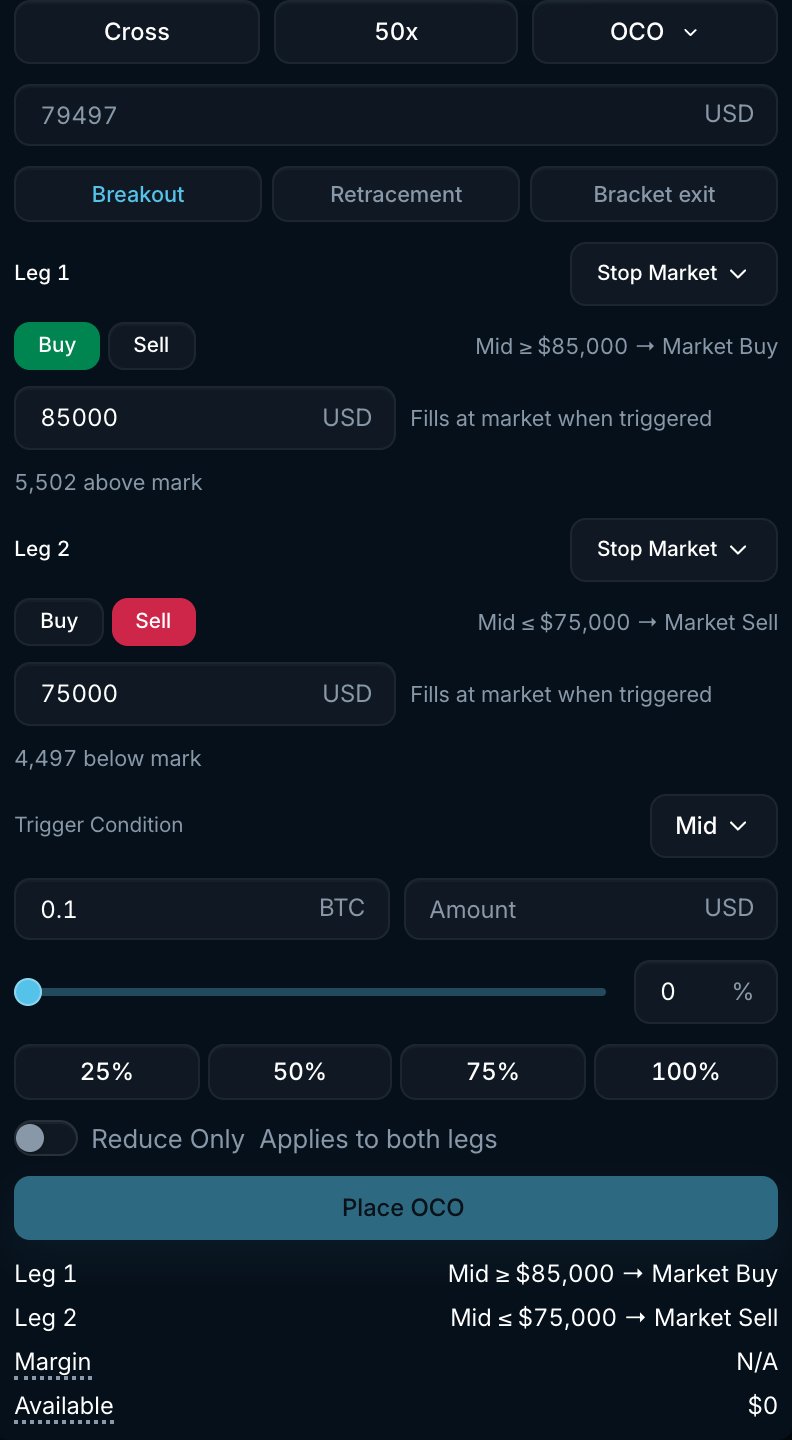
An OCO order lets you set two stop orders at the same time on the same market. Each leg has its own stop price, side and order type. The first leg whose trigger is crossed is placed as an order, and the other leg is cancelled. You can use it to trade a breakout in either direction, to buy below or sell above the current price, or to bracket an open position with a take profit and a stop loss.
 ## How it works
1. Pick a preset or configure the two legs by hand.
2. For each leg choose **Stop Market** or **Stop Limit**, **Buy** or **Sell**, and a **Stop Price** (plus a **Limit Price** for stop limit legs).
3. Choose the **Trigger Condition** price source shared by both legs: **Mid** or **Mark**.
4. Enter the **Amount**. Both legs use the same size.
5. Pacifica watches the market. When one leg's stop price is crossed, Pacifica submits that leg and cancels the other. A stop market leg places a market order using your **Max Slippage**. A stop limit leg places a **GTC** limit order at its limit price.
If both conditions are met in the same evaluation, **Leg 1** takes priority.
The other leg is cancelled when the first leg triggers, before a fill is confirmed. If the triggered order is rejected or does not fill, the cancelled leg does not become active again.
## Presets
The three buttons fill in both legs 5% away from the current mark price. Edit any field afterwards.
| Preset | Leg 1 | Leg 2 | Use |
| ---------------- | -------------------------------------------------- | ------------------------------------------------- | --------------------------------------------------------------------------------------------- |
| **Breakout** | Stop Market **Buy** above the market | Stop Market **Sell** below the market | Enter in the direction of the break. |
| **Retracement** | Stop Limit **Buy** below the market | Stop Limit **Sell** above the market | Buy below or sell above the current price. |
| **Bracket exit** | Stop Limit **Sell** above the market (take profit) | Stop Market **Sell** below the market (stop loss) | Exit a long position either way. Turns on **Reduce Only**. Flip both legs to Buy for a short. |
## Settings
| Setting | Options | What it does |
| --------------------- | ----------------------- | -------------------------------------------------------------------------------------------------- |
| **Leg type** | Stop Market, Stop Limit | Whether the leg places a market order or a resting limit order. |
| **Side** | Buy, Sell | Per leg. The two legs can be on the same side (bracket) or opposite sides (breakout, retracement). |
| **Stop Price** | Positive price | The trigger for that leg. The form shows whether it is above or below the current mark. |
| **Limit Price** | Positive price | Stop limit legs only. The price of the limit order placed after the trigger. |
| **Trigger Condition** | **Mid**, **Mark** | Shared by both legs. |
| **Reduce Only** | On / Off | Applies to both legs. |
## Example
You are long 0.1 BTC at \$100,000. You want to take profit at \$105,000 and stop out at \$95,000:
* Choose **Bracket exit**, then set **Leg 1** to Stop Limit **Sell** with **Stop Price** and **Limit Price** both at \$105,000. Set **Leg 2** to Stop Market **Sell** with **Stop Price** at \$95,000.
* Set **Amount** to 0.1 BTC, **Trigger Condition** to **Mid** and **Reduce Only** on.
* If mid reaches \$105,000 first, a limit sell at \$105,000 is placed and the stop loss is cancelled. If mid falls to \$95,000 first, a market sell is placed and the take profit is cancelled. Either order may fill partially.
## Good to know
* Only the triggered leg becomes an order. Until then an OCO holds no place in the order book queue.
* A stop limit leg rests as a GTC limit order after it triggers. If the market moves through the limit price, it may not fill.
* Open OCOs appear under the **Strategies** tab (**OCO** sub-tab). After a leg triggers, the resulting order appears in **Open Orders** or **Trade History**.
* OCO stop legs use Mid or Mark as the trigger source. Last trade price is not available for OCO.
## How it works
1. Pick a preset or configure the two legs by hand.
2. For each leg choose **Stop Market** or **Stop Limit**, **Buy** or **Sell**, and a **Stop Price** (plus a **Limit Price** for stop limit legs).
3. Choose the **Trigger Condition** price source shared by both legs: **Mid** or **Mark**.
4. Enter the **Amount**. Both legs use the same size.
5. Pacifica watches the market. When one leg's stop price is crossed, Pacifica submits that leg and cancels the other. A stop market leg places a market order using your **Max Slippage**. A stop limit leg places a **GTC** limit order at its limit price.
If both conditions are met in the same evaluation, **Leg 1** takes priority.
The other leg is cancelled when the first leg triggers, before a fill is confirmed. If the triggered order is rejected or does not fill, the cancelled leg does not become active again.
## Presets
The three buttons fill in both legs 5% away from the current mark price. Edit any field afterwards.
| Preset | Leg 1 | Leg 2 | Use |
| ---------------- | -------------------------------------------------- | ------------------------------------------------- | --------------------------------------------------------------------------------------------- |
| **Breakout** | Stop Market **Buy** above the market | Stop Market **Sell** below the market | Enter in the direction of the break. |
| **Retracement** | Stop Limit **Buy** below the market | Stop Limit **Sell** above the market | Buy below or sell above the current price. |
| **Bracket exit** | Stop Limit **Sell** above the market (take profit) | Stop Market **Sell** below the market (stop loss) | Exit a long position either way. Turns on **Reduce Only**. Flip both legs to Buy for a short. |
## Settings
| Setting | Options | What it does |
| --------------------- | ----------------------- | -------------------------------------------------------------------------------------------------- |
| **Leg type** | Stop Market, Stop Limit | Whether the leg places a market order or a resting limit order. |
| **Side** | Buy, Sell | Per leg. The two legs can be on the same side (bracket) or opposite sides (breakout, retracement). |
| **Stop Price** | Positive price | The trigger for that leg. The form shows whether it is above or below the current mark. |
| **Limit Price** | Positive price | Stop limit legs only. The price of the limit order placed after the trigger. |
| **Trigger Condition** | **Mid**, **Mark** | Shared by both legs. |
| **Reduce Only** | On / Off | Applies to both legs. |
## Example
You are long 0.1 BTC at \$100,000. You want to take profit at \$105,000 and stop out at \$95,000:
* Choose **Bracket exit**, then set **Leg 1** to Stop Limit **Sell** with **Stop Price** and **Limit Price** both at \$105,000. Set **Leg 2** to Stop Market **Sell** with **Stop Price** at \$95,000.
* Set **Amount** to 0.1 BTC, **Trigger Condition** to **Mid** and **Reduce Only** on.
* If mid reaches \$105,000 first, a limit sell at \$105,000 is placed and the stop loss is cancelled. If mid falls to \$95,000 first, a market sell is placed and the take profit is cancelled. Either order may fill partially.
## Good to know
* Only the triggered leg becomes an order. Until then an OCO holds no place in the order book queue.
* A stop limit leg rests as a GTC limit order after it triggers. If the market moves through the limit price, it may not fill.
* Open OCOs appear under the **Strategies** tab (**OCO** sub-tab). After a leg triggers, the resulting order appears in **Open Orders** or **Trade History**.
* OCO stop legs use Mid or Mark as the trigger source. Last trade price is not available for OCO.