> ## Documentation Index
> Fetch the complete documentation index at: https://docs.pacifica.fi/llms.txt
> Use this file to discover all available pages before exploring further.
# Conditional Limit
> Place a limit order when a chosen market meets a price condition, with control over the limit price and time-in-force.
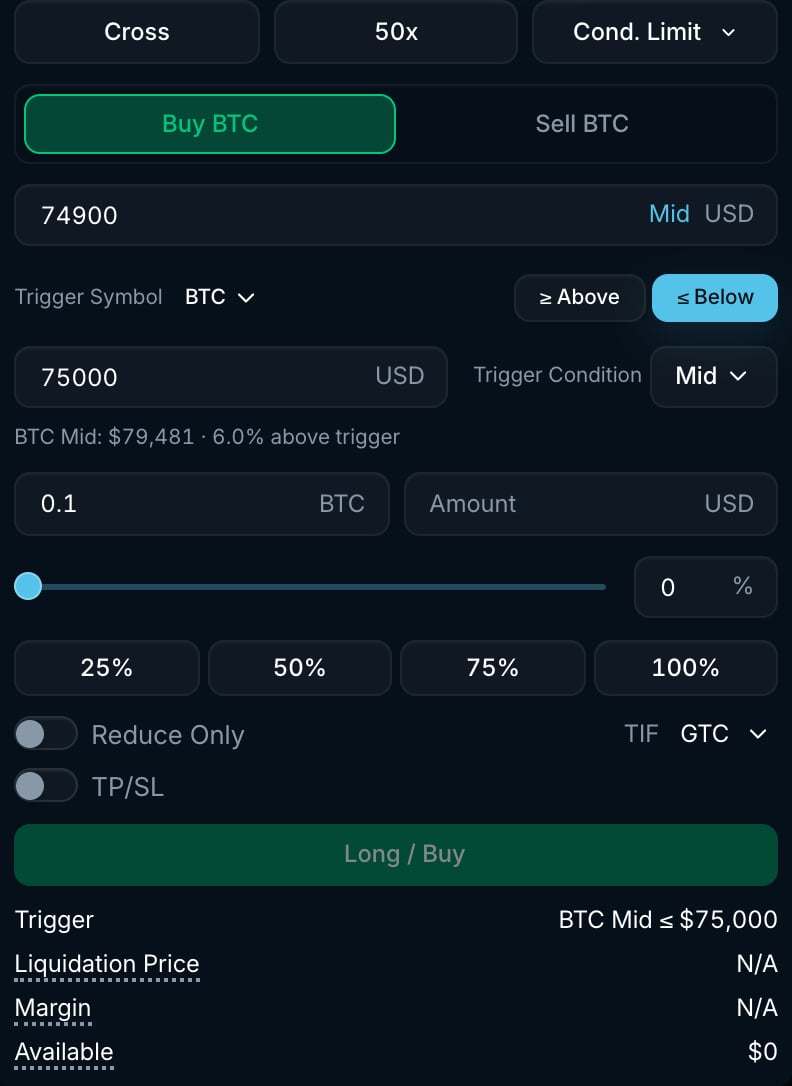
A Conditional Limit order waits for a price condition, then places a limit order at the **Price** and **TIF** you choose. Select **Cond. Limit** in the order form.
Unlike a [Stop Limit](/trading-on-pacifica/order-types/classic/stop-limit) order, the trigger can watch a **different market** from the one you trade. It can also use the **best bid** or **best ask**, and the resulting order can use any time-in-force.
 ## How it works
1. Pick the **Trigger Symbol**. It defaults to the market you are trading, but you can watch another market on Pacifica.
2. Choose **≥ Above** or **≤ Below**, then enter the **Trigger Price**.
3. Choose the **Trigger Condition** price source: **Mid**, **Mark**, **Last**, **Best Bid** or **Best Ask**.
4. Enter the **Amount**, limit **Price** and **TIF**, then choose your side.
5. When the chosen price meets the condition, Pacifica submits the limit order. Its time-in-force determines what happens to any unfilled amount.
If the condition is already true when you submit, the form warns you and the order can trigger as soon as the condition is evaluated. The strategy submits one order and does not trigger again.
## Settings
| Setting | Options | What it does |
| --------------------- | ------------------------------------------------------- | ---------------------------------------------------------------------------------------------------------------------- |
| **Trigger Symbol** | Any market | The market whose price is watched. Can differ from the market you trade. |
| **≥ Above / ≤ Below** | Above / Below | Trigger when the watched price is at or above, or at or below, the trigger price. |
| **Trigger Price** | Positive price | The level to watch. |
| **Trigger Condition** | **Mid**, **Mark**, **Last**, **Best Bid**, **Best Ask** | The price source compared against the trigger price. |
| **Price** | Positive price | The limit price of the order placed after the trigger. |
| **TIF** | **GTC**, **IOC**, **ALO**, **TOB** | How the limit order is handled. See [Time-in-force](/trading-on-pacifica/order-types/classic/limit#time-in-force-tif). |
| **Reduce Only** | On / Off | Only reduces an existing position. Cannot be combined with **TP/SL**. |
| **TP/SL** | Optional | Take profit and stop loss attached to the resulting order. Its trigger source can be **Mark**, **Last** or **Mid**. |
## Example
You expect BTC to bounce after a dip and want to place a limit buy when its mid price reaches \$95,000:
* Select **Cond. Limit**, with **Trigger Symbol** set to BTC, **≤ Below** \$95,000 and **Trigger Condition** set to **Mid**.
* Set **Price** to \$94,900, **TIF** to **GTC** and **Amount** to 0.1 BTC.
* When mid reaches \$95,000 or lower, a GTC limit buy at \$94,900 is placed. Any unfilled amount rests until it fills or you cancel it.
## Good to know
* Reaching the trigger does not guarantee a fill. The market may move away from your limit price.
* Use **ALO** for a post-only order or **TOB** for a top-of-book order. See [Time-in-force](/trading-on-pacifica/order-types/classic/limit#time-in-force-tif).
* Open conditional orders appear in **Strategies**, under **Conditional Orders**. A resting limit order appears in **Open Orders** after the trigger.
* To place a market order when the condition is met, use [Conditional Market](/trading-on-pacifica/order-types/strategies/conditional-market).
## How it works
1. Pick the **Trigger Symbol**. It defaults to the market you are trading, but you can watch another market on Pacifica.
2. Choose **≥ Above** or **≤ Below**, then enter the **Trigger Price**.
3. Choose the **Trigger Condition** price source: **Mid**, **Mark**, **Last**, **Best Bid** or **Best Ask**.
4. Enter the **Amount**, limit **Price** and **TIF**, then choose your side.
5. When the chosen price meets the condition, Pacifica submits the limit order. Its time-in-force determines what happens to any unfilled amount.
If the condition is already true when you submit, the form warns you and the order can trigger as soon as the condition is evaluated. The strategy submits one order and does not trigger again.
## Settings
| Setting | Options | What it does |
| --------------------- | ------------------------------------------------------- | ---------------------------------------------------------------------------------------------------------------------- |
| **Trigger Symbol** | Any market | The market whose price is watched. Can differ from the market you trade. |
| **≥ Above / ≤ Below** | Above / Below | Trigger when the watched price is at or above, or at or below, the trigger price. |
| **Trigger Price** | Positive price | The level to watch. |
| **Trigger Condition** | **Mid**, **Mark**, **Last**, **Best Bid**, **Best Ask** | The price source compared against the trigger price. |
| **Price** | Positive price | The limit price of the order placed after the trigger. |
| **TIF** | **GTC**, **IOC**, **ALO**, **TOB** | How the limit order is handled. See [Time-in-force](/trading-on-pacifica/order-types/classic/limit#time-in-force-tif). |
| **Reduce Only** | On / Off | Only reduces an existing position. Cannot be combined with **TP/SL**. |
| **TP/SL** | Optional | Take profit and stop loss attached to the resulting order. Its trigger source can be **Mark**, **Last** or **Mid**. |
## Example
You expect BTC to bounce after a dip and want to place a limit buy when its mid price reaches \$95,000:
* Select **Cond. Limit**, with **Trigger Symbol** set to BTC, **≤ Below** \$95,000 and **Trigger Condition** set to **Mid**.
* Set **Price** to \$94,900, **TIF** to **GTC** and **Amount** to 0.1 BTC.
* When mid reaches \$95,000 or lower, a GTC limit buy at \$94,900 is placed. Any unfilled amount rests until it fills or you cancel it.
## Good to know
* Reaching the trigger does not guarantee a fill. The market may move away from your limit price.
* Use **ALO** for a post-only order or **TOB** for a top-of-book order. See [Time-in-force](/trading-on-pacifica/order-types/classic/limit#time-in-force-tif).
* Open conditional orders appear in **Strategies**, under **Conditional Orders**. A resting limit order appears in **Open Orders** after the trigger.
* To place a market order when the condition is met, use [Conditional Market](/trading-on-pacifica/order-types/strategies/conditional-market).