> ## Documentation Index
> Fetch the complete documentation index at: https://docs.pacifica.fi/llms.txt
> Use this file to discover all available pages before exploring further.
# Limit
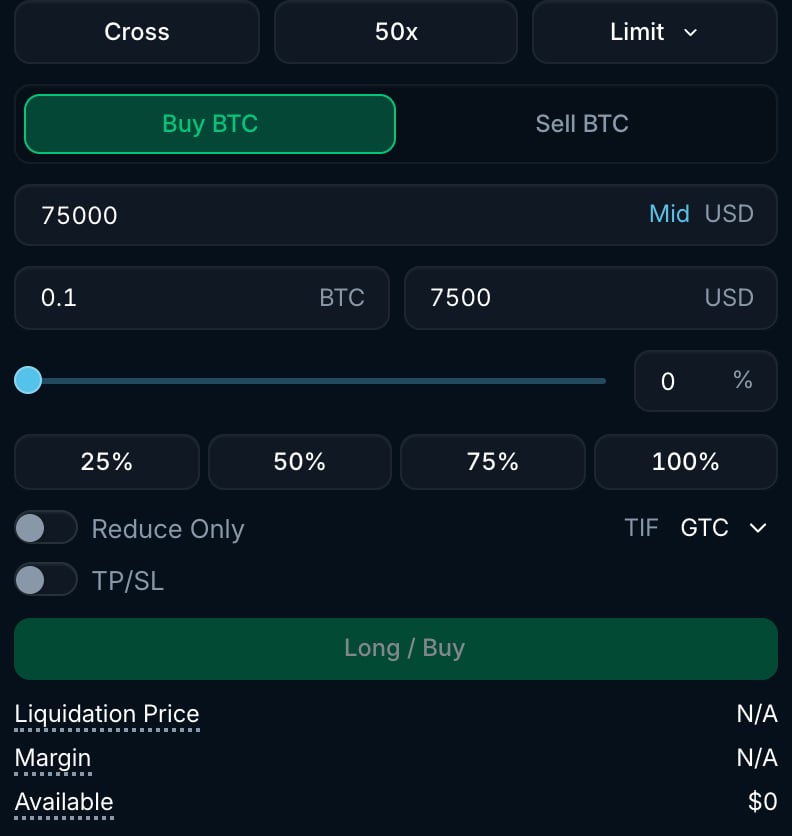
> Set the price you are willing to trade at and choose how unfilled orders are handled.
A limit order buys at your limit price or lower, or sells at your limit price or higher. It can fill immediately if that price matches an existing order. Its time-in-force determines what happens to any unfilled amount. Use a limit order when the execution price matters more than being filled immediately.
 ## Time-in-force (TIF)
Every limit order on Pacifica uses one of the following TIF options.
* **Good-Til-Cancelled (GTC):** The order remains active on the order book until it is either filled or cancelled.
* **Immediate-or-Cancel (IOC):** The order attempts to match immediately at the specified price (or better). Any portion that is not filled immediately is cancelled.
* **Add-Liquidity-Only (ALO):** Also known as **"Post Only"**. The order is added to the order book only if it does not immediately match against an existing order. If it would cross, it is cancelled.
* **Top-of-Book (TOB):** An ALO order that would cross the book is placed at the best possible maker price instead of being cancelled. For a buy, that is the lowest ask minus one tick. For a sell, it is the highest bid plus one tick.
## Time-in-force (TIF)
Every limit order on Pacifica uses one of the following TIF options.
* **Good-Til-Cancelled (GTC):** The order remains active on the order book until it is either filled or cancelled.
* **Immediate-or-Cancel (IOC):** The order attempts to match immediately at the specified price (or better). Any portion that is not filled immediately is cancelled.
* **Add-Liquidity-Only (ALO):** Also known as **"Post Only"**. The order is added to the order book only if it does not immediately match against an existing order. If it would cross, it is cancelled.
* **Top-of-Book (TOB):** An ALO order that would cross the book is placed at the best possible maker price instead of being cancelled. For a buy, that is the lowest ask minus one tick. For a sell, it is the highest bid plus one tick.